Ink Paint Brush Stroke Background: Designer Review
When you spend as much time as I do hopping up projects for clients and testing machine embroidery designs for my own shop, you start to see digital assets differently. It’s not just about whether a graphic looks cool on a screen. It has to earn its place in the production pipeline. It needs to save time, improve the finished product, or help me sell better. The Ink Paint Brush Stroke Background Bundle is one of those assets that sits at an interesting intersection—it isn’t an embroidery file itself, but it is a powerful tool for anyone doing custom apparel, handmade products, or selling digital embroidery files. Let me break down how this collection of Textures and Graphics actually performs in a real embroidery and craft business workflow.
First Impressions: The Mood of the Ink
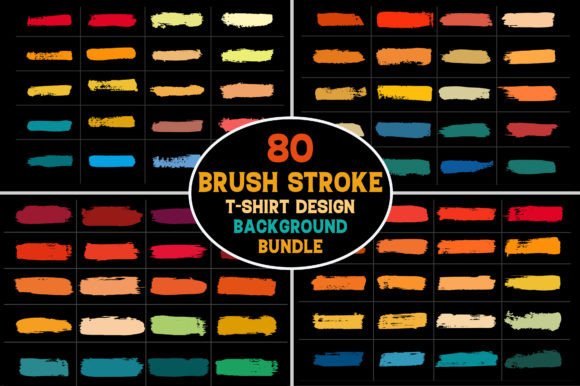
Opening the bundle, I immediately noticed the raw, expressive personality of the brush strokes. These aren’t sterile, perfect vectors. They feel organic, with ink bleeds, varying pressure points, and a loose artistic hand. For an embroiderer or small shop owner, this aesthetic is gold. It cuts through the overly clean, digitized look that dominates a lot of commercial embroidery. If you are making boutique merchandise, personalized gifts, or custom apparel for artistic brands, this mood sets you apart.
You get 80 PNG files at 300 DPI with transparency, plus 4 EPS files. The transparent PNGs are my go-to for mockups. The high resolution means I can drop them into a sweatshirt mockup, scale them up, and the grain holds perfectly. The EPS files give vector users a clean path for further manipulation, like creating stencils for fabric paint or cutting exact masks for screen printing.
The Real Case: Print Then Stitch on a Sweatshirt
Let me walk you through a specific project I tackled with this bundle. A client wanted a limited run of artist-designed sweatshirts for a gallery opening. They loved the look of ink wash but wanted an embroidered element for texture and permanence. Here is where the Ink Paint Brush Stroke Background Bundle became the hero.
- The Print Base: I used one of the larger brush stroke PNGs as a direct-to-garment (DTG) print base on a cream-colored sweatshirt. The ink bleed effect looked painted directly onto the fabric.
- The Embroidery Layer: Over that printed brush stroke, I digitized a clean, bold logo using a dense satin stitch. The contrast between the flat, watercolor-style ink print and the raised, shiny thread was stunning.
- The Result: It created a mixed-media finished product that felt luxurious and bespoke. Customers perceived extremely high value because it wasn't just a print or just an embroidery—it was a deliberate design.
This is the core strength of these Graphics. They are not the embroidery itself, but they are the foundation that makes the embroidery pop. If you are doing custom apparel for boutiques, weddings, or holiday gifts, this print-and-stitch approach is a massive differentiator.
Digital Mockups for Your Embroidery Business
If you sell digital embroidery files on Etsy or your own site, you know that the photo makes the sale. Stitching out every design in every size is impossible. This is where this bundle of Textures shines brightest. I took the transparent PNG ink backgrounds and layered my machine embroidery design mockups over them in my editing software.
Instead of a sterile white background, my embroidered patch designs now looked like they were resting on a painted canvas or a distressed denim jacket. The 300 DPI resolution meant the texture was crisp. My listing engagement went up because the mockups looked like finished, artistic products. For a digital product seller, this bundle is an invaluable asset for branding your shop.
Where to Use This Bundle Carefully in Embroidery
Every experienced embroidery designer knows that what works on a flat screen doesn't always work in the hoop. Here is my practical, hands-on advice for using this bundle in actual projects.
Hoop Size and Stitch Density
A full ink brush stroke background is large. If you try to convert a complex, high-resolution brush stroke directly into an embroidery file using auto-digitizing, you will likely end up with a disaster of high stitch density and broken needles. The ink splatters create tiny, disconnected shapes that don't stitch well as a fill stitch or running stitch.
My advice: Use the EPS files in your digitizing software. Trace the main shapes of the brush stroke into clean vector paths. Assign a tatami fill or a long satin stitch to the core of the stroke. Let the "ink splatters" be separate, smaller elements. This gives you the look of the brush stroke without the technical nightmares of a dense, unruly embroidery file. Always test on scrap fabric first to check the stitch density and thread color contrast against your actual fabric texture.
Fabric and Stabilizer Choices
If you are printing the brush stroke onto fabric (DTG or screen print) and then embroidering over it, be mindful of the fabric texture. A heavy ink layer can stiffen the fabric. I recommend a tear-away or cutaway stabilizer depending on the stitch density of your top embroidery. For stretchy fabrics like jersey t-shirts, a cutaway stabilizer is non-negotiable to prevent the embroidery from puckering around the printed area.
For darker fabrics, the ink brush strokes in this bundle tend to work best as a lighter overlay or a bold white/metallic accent. Check your thread colors carefully. A black brush stroke on a black sweatshirt with black thread is just a mess. You need contrast to make the embroidery legible.
Product Applications Across Your Craft Business
I’ve tested this across several product categories, and here is where it fits naturally:
- Tote Bags and Aprons: The bold, large-scale nature of the brush strokes is perfect for canvas totes. Use the PNG to create a heat transfer or screen print, then add a small embroidered patch or monogram in the center.
- Baby and Holiday Embroidery: For personalized baby gifts or holiday decor, smaller brush stroke accents work wonderfully as a background texture for a name or date. Think a soft ink wash on a pillow cover with a satin stitch name over it.
- Caps and Curved Surfaces: Be very careful here. A large background graphic on a cap front can distort easily. Stick to using the brush stroke textures as a print on the brim or side, and keep the embroidery small and centered. The curved surface of a cap does not forgive complex backgrounds.
- Embroidered Patches: This is a huge win. Print the ink background onto printable fabric or use it as a stencil with fabric paint. Cut out the shape and embroider over it. You get custom patches with an artistic, hand-painted background that no one else has.
Building Customer Trust with Professional Presentation
As a creative entrepreneur, your presentation is your reputation. When a customer receives a personalized gift or a handmade product, they are judging the thoughtfulness and the aesthetic. Using a design asset like this allows you to create a consistent brand style across your entire shop. Whether it’s a custom sweatshirt for a client or a holiday gift for a family member, the ink paint brush stroke aesthetic conveys an artistic, premium level of care. It elevates a simple applique design or a basic fill stitch into something that looks like it came from a high-end boutique. This increases the perceived value of your finished product and builds trust that you are a professional, not just a hobbyist.
Practical Designer Notes Before You Buy
Before you hit purchase, here are the hard facts you need to consider for your embroidery project:
- It’s Not an Embroidery File: This is a Graphics and Textures bundle. You will need digitizing software or a printing setup to use it for embroidered products. Do not expect a ready-to-stitch file.
- Check the License: The description includes files for "T-Shirt Design Other Paintable Decoration Design." If you are a digital product seller, confirm that the license covers commercial use of the digital files (like in mockups) or resale of printed items. Always verify the End User License Agreement before integrating into your craft business.
- Test in Black and White: I always take a brush stroke PNG, convert it to black and white, and look at the value range. This tells me exactly where the light and dark areas fall, which is crucial for choosing thread colors and ensuring the embroidery won't get lost in the texture.
- Hoop Size Matters: Plan your hoop size based on the scale of the background. A large ink splash demands a 5x7 or 6x10 hoop for the print and the embroidery to coexist without crowding.
Final Verdict for the Handmade and Digital Seller
The Ink Paint Brush Stroke Background Bundle is not a one-click solution for your next embroidery project. It is a versatile creative asset for designers who understand the value of mixed media. It helps you build better mockups, create unique print-and-stitch custom apparel, and brand your small shop with a consistent, artistic voice. If you are an Etsy seller, a boutique brand, or a crafter looking to add a layer of texture and professionalism to your finished products without reinventing the wheel, this bundle deserves a spot in your design assets folder. Just remember to respect the limitations of stitch density and fabric texture, and you will create pieces that genuinely stand out in a crowded market.